
Search
How do I activate my node-locked license? (Legacy / EOL)
Applies to EXOSTIV Dashboard (v1 / Legacy / EOL)
Online activation
The ‘Manage license’ window prompts at first software startup. To open it manually, click on ‘Help > Manage license’.
Example for EXOSTIV Dashboard:
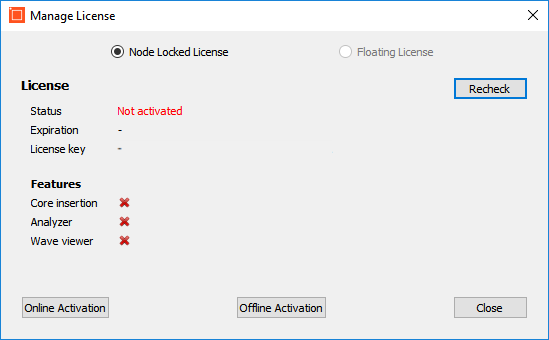
From this window, select node-locked license.
The easiest way to activate your license is to go through online activation:
Click on ‘Online activation’
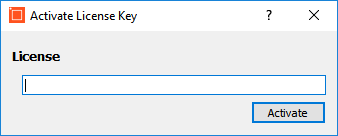
Enter the license key that you received when you purchased your license and click on ‘Activate’.
Example for EXOSTIV Dashboard:
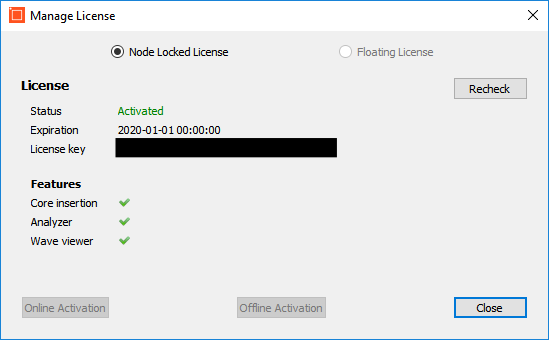
If you cannot activate your license online, you can use ‘Offline activation’ – see below.
Offline activation
From the ‘Manage license’ window, click on ‘Offline Activation’.
Follow the instructions of the window that opens.
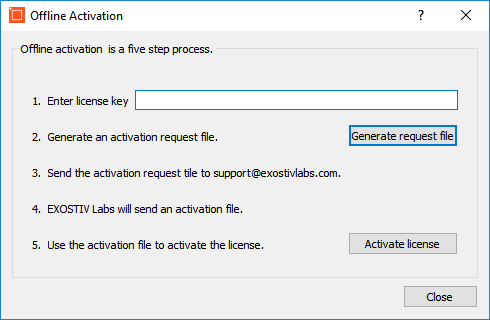
You’ll need to generate an ‘Activation request file’ and send it to Exostiv Labs to receive the corresponding ‘activation response’ file.