
Skip to main content
Search
Floating license server setup and administration
Exostiv Probe and Exostiv Blade software packages include executables for the floating license server.
The executable is:
– ExoLicSrv.exe for Win64 OSes.
– ExoLicSrv for Linux OSes.
Starting the license server opens the license server application GUI:
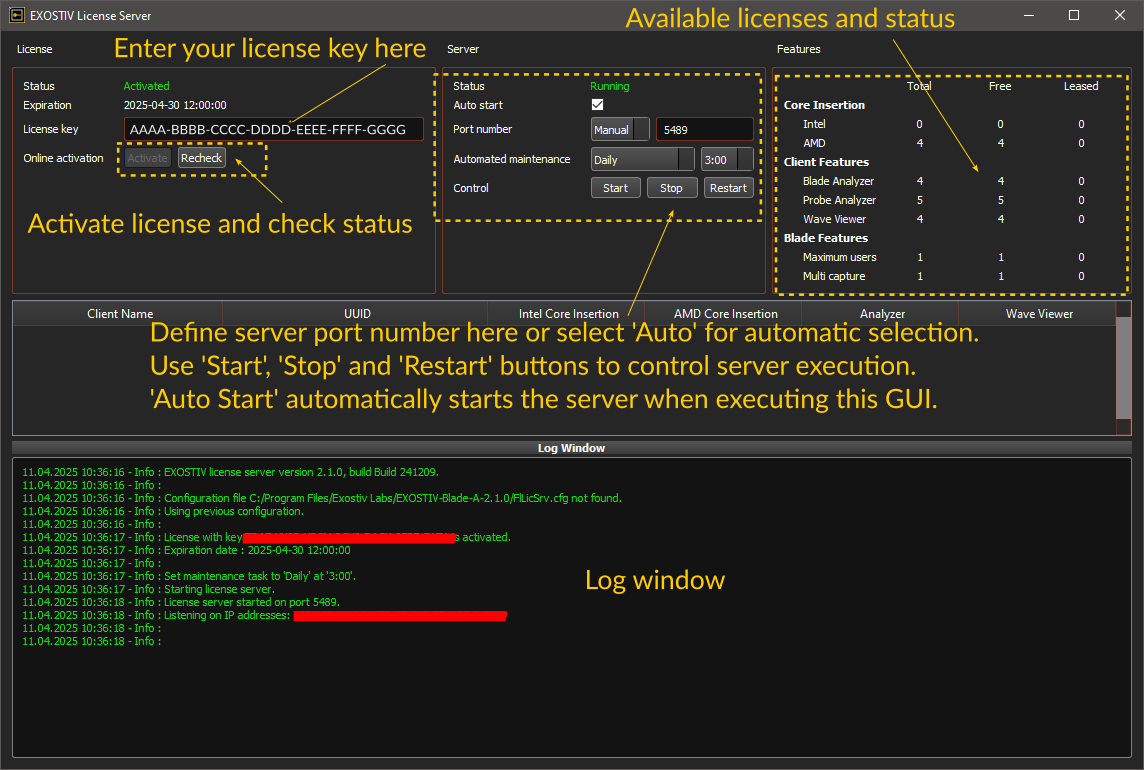
To be able to lease and use floating licenses follow the steps below:
- Activate the license in the license server. See the following article: How do I install the license server for floating licenses?
- Define the port number, the auto-start option and start the server. The server must be running before you can lease a license with the client application.
- Set up the client application to lease the license from this server. For this, you’ll need to know: the IP address of the machine where the server is installed and the port number (defined above) and follow these instructions: How to set Exostiv software to lease license from the floating license server?
Remarks:
- If the license server is run from the same machine as for the client application, the client application can be set up to point to the local IP address “127.0.0.1”.
- Leasing a license from the client application requires a simple TCP communication over the network, to the designated port. Please make sure that the IT infrastructure and policies allow this. Pay special attention to firewalls potentially blocking these communications.
- You can host the legacy v1 license server application and the v2 software license server application on the same ‘physical machine’. The 2 server software should run in parallel with their own parameters – especially have a distinct port number.
-
Additional resource: run the license server without GUI – Can I run the floating license server as a service?