Search
What is Maestro and what is it useful for?
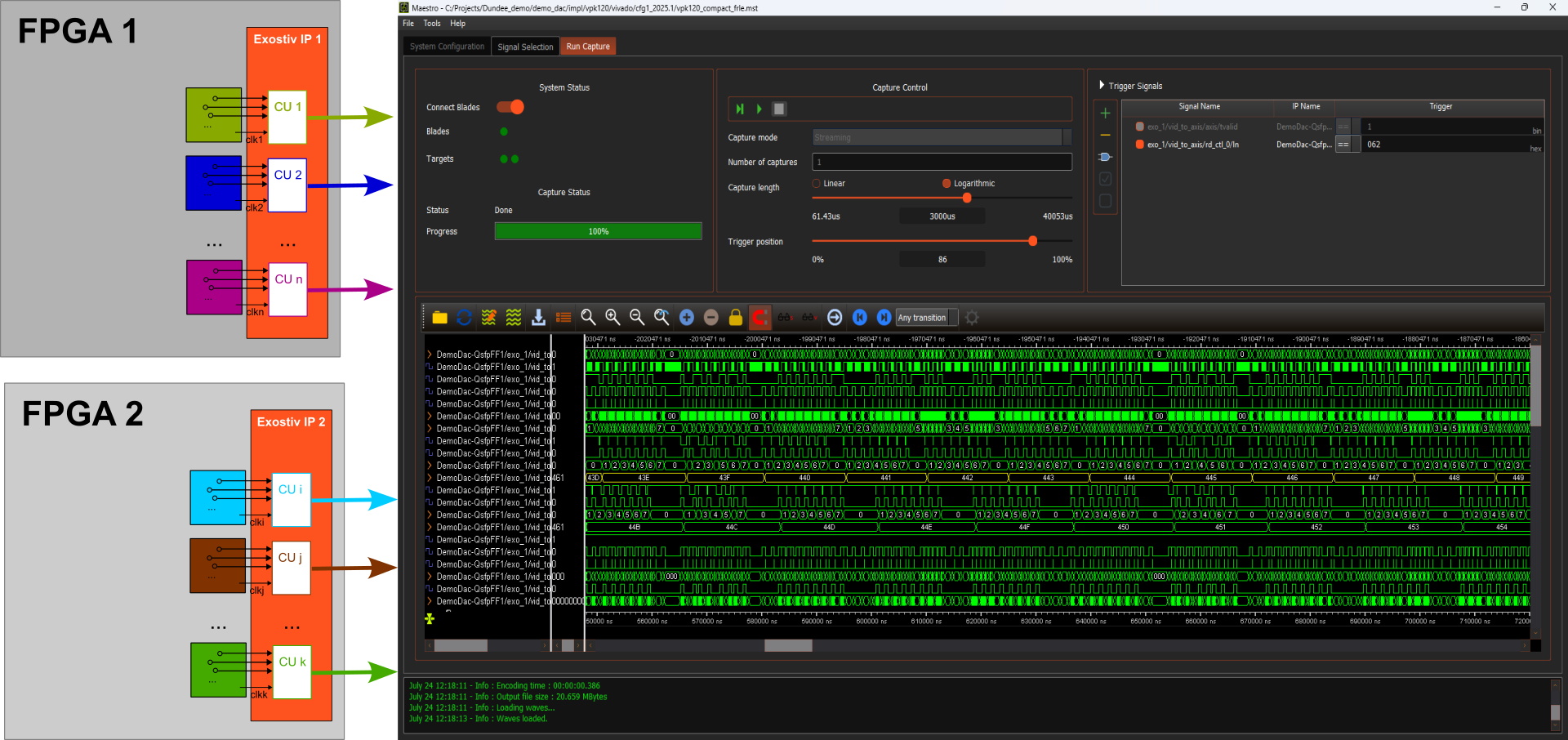
Maestro is optional software that runs on top of the Exostiv Blade and Exostiv Probe software suites.
Maestro uses advanced Exostiv IP features to capture data from multiple sources and display it in a single waveform viewer.
How Exostiv tools capture data
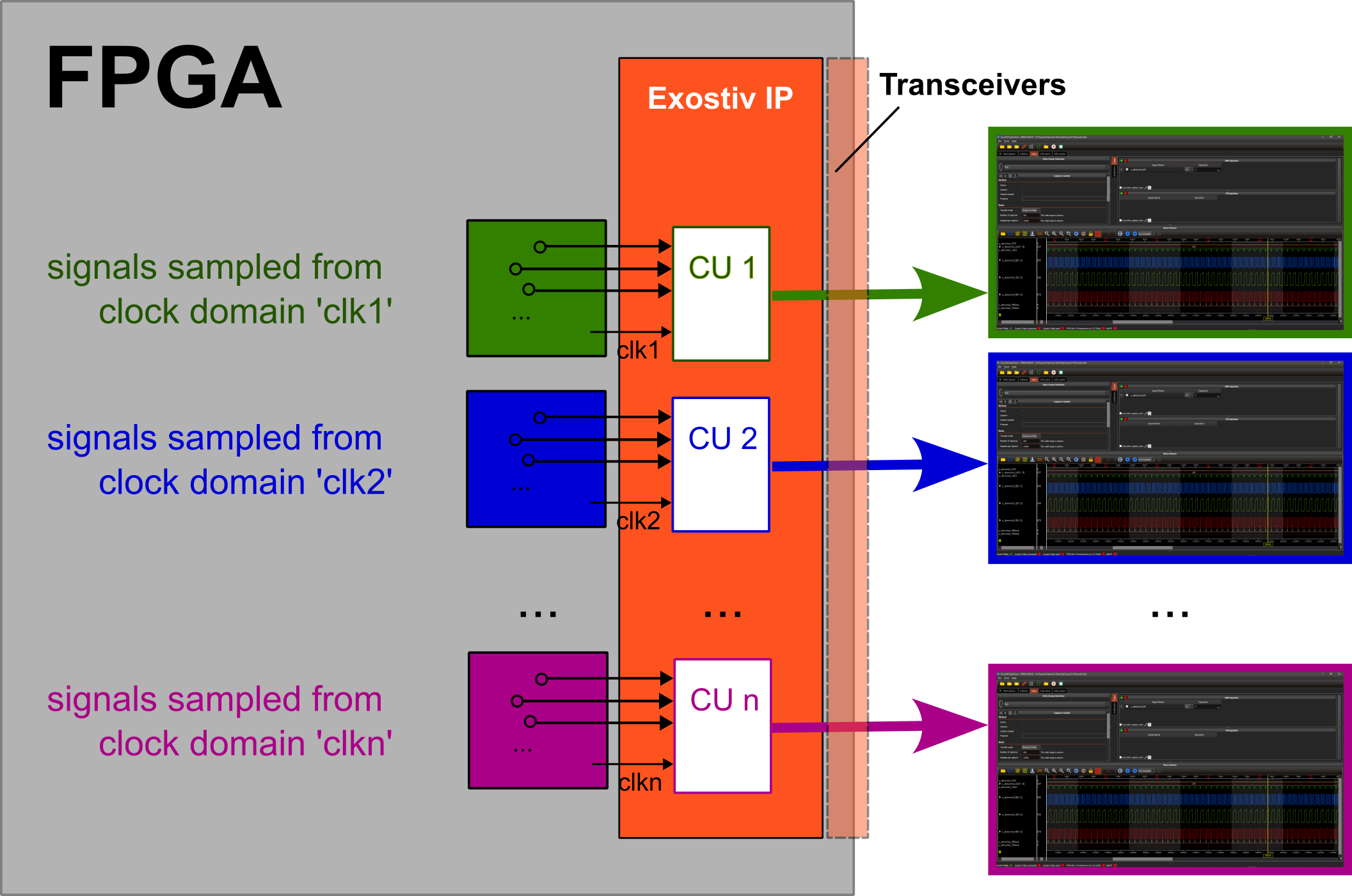
Using Exostiv Probe or Exostiv Blade involves inserting one or more Exostiv IP instances into one or more FPGAs.
Each Exostiv IP instance contains capture units: FPGA logic that samples and captures data. Capture units are controlled from the Exostiv Probe or Exostiv Blade software, where the user defines the capture settings (for example, capture length, trigger condition and number of repeated captures). Each capture unit uses one clock from the design under test as the sampling clock for its clock domain. The sampling clock is selected at IP insertion.
As a result, captures can come from one or more capture units in different clock domains, and therefore at different sampling rates. This applies whether the capture units belong to the same IP instance or to different ones.
The captured data is transferred to the Exostiv Probe or Exostiv Blade hardware through the transceiver interfaces attached to each IP instance, and is then displayed as waveforms. The data captured by each capture unit is displayed in a separate waveform window.
Note that Exostiv tools make no assumption about the relationship between clocks. Data is sampled according to the capture settings, as in state analysis. Apart from the sampling clock frequency entered by the user at IP insertion, captured data sets contain no timing information. Samples are referenced by sample number instead.
Limitations of this approach
When multiple data sets come from the same FPGA or the same system of FPGAs, viewing captures from different clock domains separately leaves out important information:
- the relative position in time of each data set is unknown;
- each data set is displayed on its own timescale.
This approach works well for analyzing each clock domain on its own. It does not allow users to analyze all data sets as parts of a single system.
The Exostiv Fusion tool can synchronize and rescale data sets into a merged waveform view, based on shared trigger events and sampling frequencies. This step must be performed manually after each capture, or scripted in Python. In both cases, the user must set up the synchronization explicitly.
Synchronizing data from multiple IP instances and capture units also requires detailed knowledge of how each IP instance is structured. This becomes difficult in large systems and in teams where the person analyzing the data did not insert the IP.
Users are generally interested in observing their system, not in how it was instrumented. Ideally, the capture layer should be transparent: users should be able to view synchronized data without knowing the details of how the Exostiv IP instances were inserted.
Maestro hides the capture layer and lets users observe the system as a whole.
Maestro:
- collects the information from the project files of multiple Exostiv IP capture units and instances;
- lists the observable signals, as a tree or a list, following the hierarchy of the target system across all included IP instances;
- extracts the capture and trigger capabilities of each Exostiv IP instance, and manages a master/slave trigger scheme across all data sources;
- uses a common time base across multiple capture units and IP instances;
- synchronizes and controls capture execution across multiple capture units and IP instances;
- merges all data sources into a single synchronized waveform view on a common timescale.