
Exostiv Core Inserter
The Core Inserter generates and inserts the Exostiv instrumentation IP into your FPGA design. It is the starting point for any Exostiv capture session — Probe or Blade.
What it does
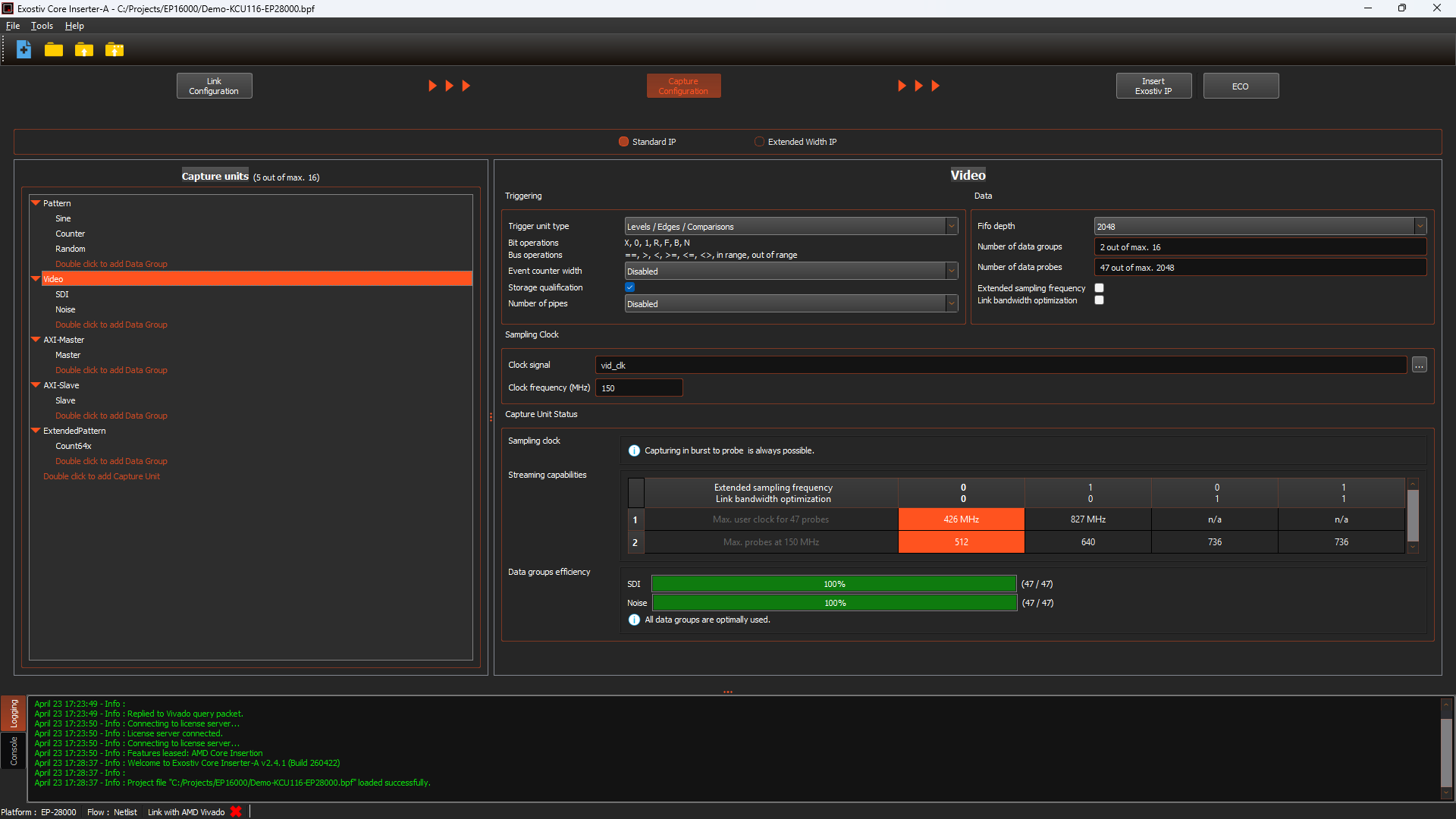
The Core Inserter handles four tasks: selecting the IP type and configuring the FPGA transceiver links it uses; setting capture resources and features per capture unit; defining which design nodes to observe; and generating the IP — optionally inserting it directly into the design.
The output is a .bpf project file that the Probe Client or Blade Client reads to connect to the running IP on your FPGA board.
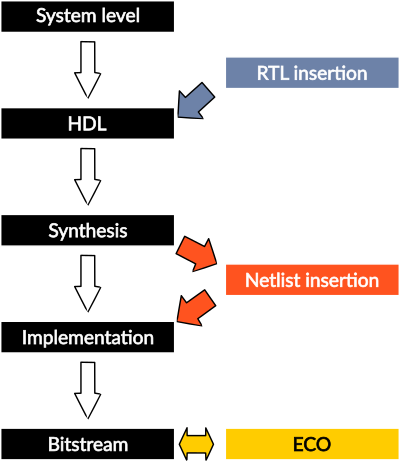
Insertion flows
Three insertion modes are supported, from fastest iteration to most automated:
RTL insertion
Generates a netlist with a VHDL or Verilog wrapper, constraints, and an insertion template. You insert it into your RTL and re-run synthesis and implementation. Works with all supported FPGA families.
Netlist insertion
Works on a post-synthesis checkpoint. The Core Inserter inserts the IP automatically, then runs place-and-route and bitstream generation. No manual HDL changes required.
ECO update
Works on a post-place-and-route checkpoint. Modifies which nodes are observed without changing IP resources — the fastest option when you need to adjust the observation set without a full rebuild.
Exostiv Blade IPs overview
Exostiv Blade offers a range of IP types tailored to accommodate diverse capture scenarios.
Exostiv Blade Standard IP offers unparalleled flexibility, heightened interactivity in capture scenarios, and the fastest sampling speed, reaching up to 800 MHz.
With Exostiv Blade Extended Width IP*, users can achieve the widest reach of up to 65k nodes while minimizing the impact on FPGA resources. By integrating multiple instances of either Exostiv Blade IP, users can expand their node coverage even further within a single or across multiple FPGAs. Each IP instance uses from 1 to 4 FPGA transceivers.
Standard IP
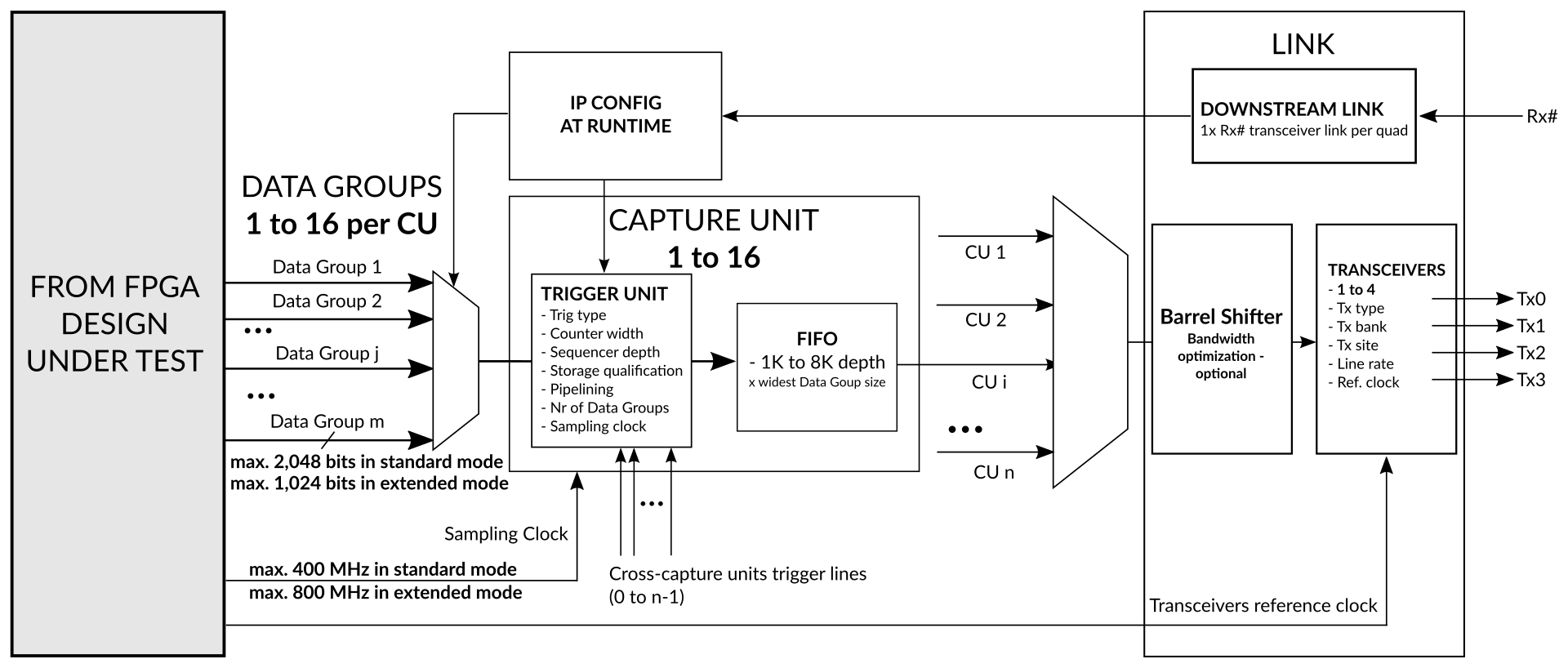
Main features include:
- Multiple capture unit with distinct sampling clock source
- Sampling up to 800 MHz
- Up to 16 x 2K bits simult. sampling per IP core instance
- Multiple data groups with dynamic selection at runtime
- Cross-clock domain triggering and data qualification
- Trigger positioning across the whole Exostiv Probe capture memory
- BRAM-based and Streaming (DDR based) modes of captures
Extended width IP
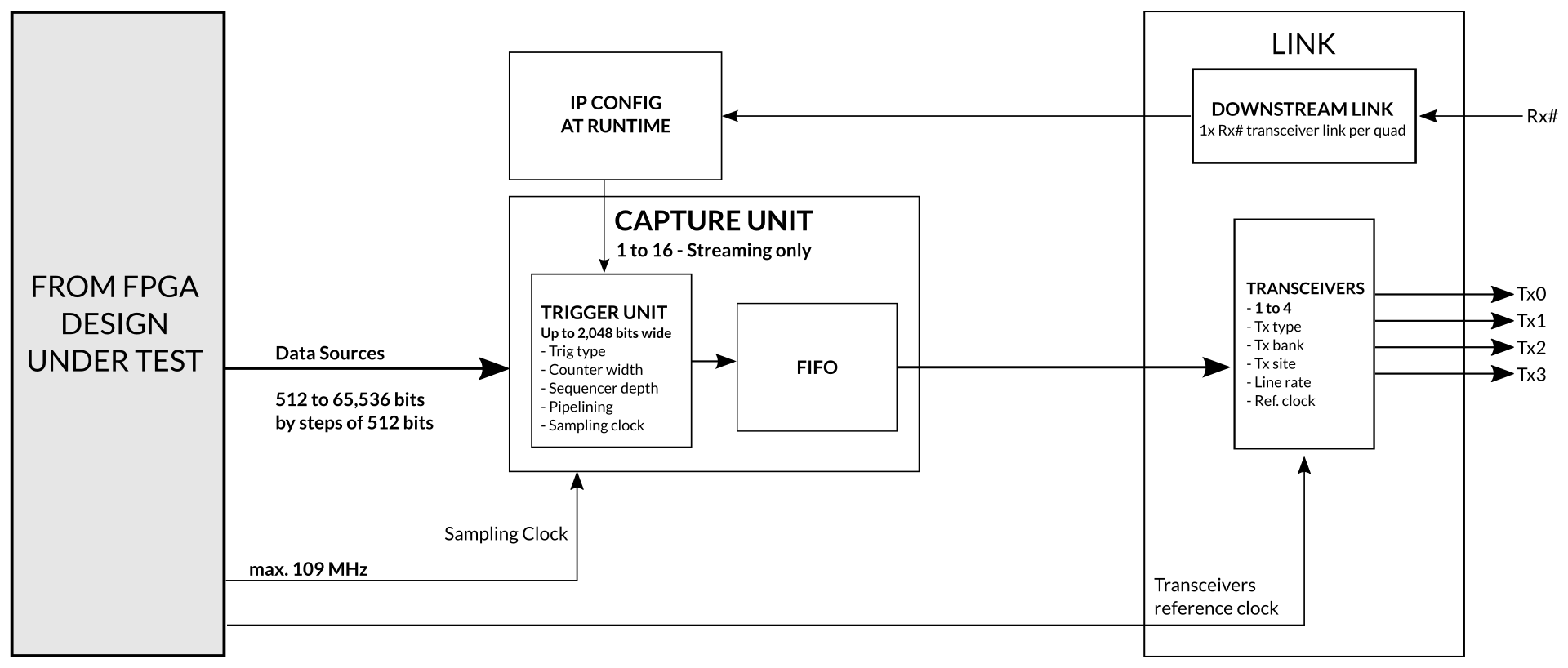
Main features include:
- Multiple capture units with distinct sampling clock source
- Sampling up to 109 MHz
- Up to 65K bits simult. sampling per IP core instance
- Extremely small footprint.
- Triggering on up to 2,048 inputs
- Trigger positioning across the whole Exostiv Probe capture memory
- Streaming (DDR based) mode of capture
Exostiv Blade IPs are configured, generated and inserted with the Exostiv Blade Core Inserter software. Exostiv Blade Core Inserter includes controls used to:
- Select the IP type.
- Define the location and settings of the FPGA transceivers used by the IP instance.
- Define the features and FPGA resources used by the IP.
- Set up the inputs ports of the IP instance and possibly select the observed nodes from the design under test.
- Generate and potentially insert the IP core into the target design.
Workflow
1 — Project setup
Create a new project. Select whether you are targeting an Exostiv Blade or Probe unit. Choose the insertion flow (RTL, Netlist, or ECO).
2 — Link configuration
Specify the FPGA part, transceiver links, reference clock settings, and downstream link rate. Each IP instance requires its own physical transceiver connection to the capture unit.
3 — Capture configuration
Set up capture units and data groups. Configure per-unit resources: trigger complexity, counters, qualification conditions, FIFO size, sampling clock, and streaming vs. burst mode.
4 — Generate and insert
Generate the IP. In Netlist or ECO mode, the Core Inserter connects the selected nodes and optionally runs implementation and bitstream generation. The resulting .bpf file is used by the Probe or Blade Client.
Walkthrough demo
Ready to get started?
The Core Inserter is included with your Exostiv Probe or Blade software package.