
Search
Maestro principles and requirements
Maestro uses a series of specific features and resources available in Exostiv IP. As optional add-on software aimed at making the capture layer of Exostiv Labs products transparent to the user, Maestro intentionally does not offer the modes of operation that require a deeper understanding of the underlying IP structures. Depending on the usage, either Maestro or the traditional Exostiv Blade Client or Exostiv Probe Client can be the best fit.
Reference time counter
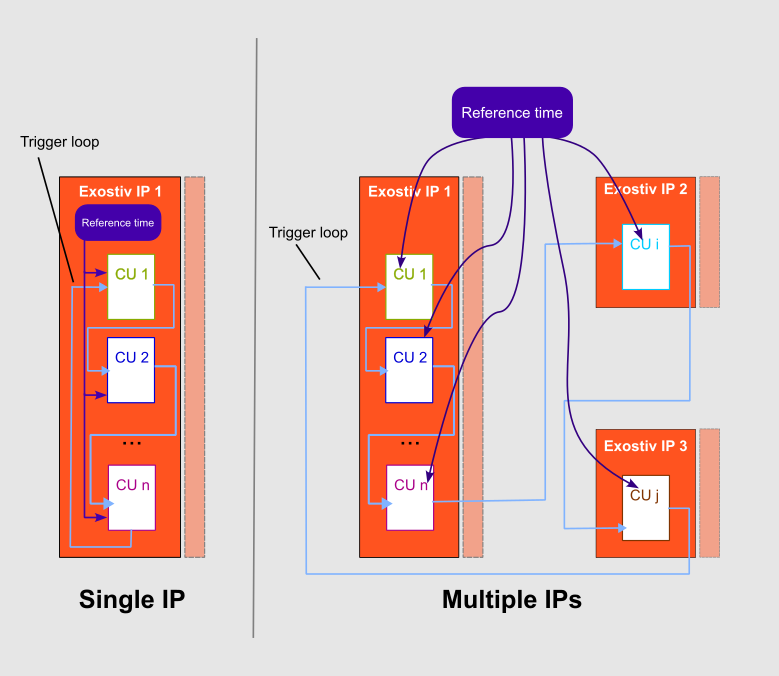
To enable and synchronize captures from capture units in different clock domains, all capture units must share a common time reference. The capture units use this time reference to measure and compensate for the delays between capture units and between IP instances.
With a single IP instance (always the case with Exostiv Probe), the time reference is enabled with an option in the Exostiv Core Inserter. It is set up automatically at core generation as part of the Exostiv IP. The counter uses a reference clock that is selected from the clocks connected to the IP instance, or derived from them.
With multiple IPs instances (possible only with Exostiv Blade), the user must manually create and connect the reference time counter to all IP instances in the RTL design. In that case, specific inputs are created to connect the counter and specify the clock frequency used with the counter.
The time reference is also used, together with the frequency of each sampling clock, to display the data from all capture units on a common timescale.
Trigger
Trigger loop
A capture starts when a trigger event occurs. This event is defined in one capture unit – called the master capture unit – using that capture unit’s local trigger logic. It is then sent to the other capture units through a daisy chain of trigger signals.
- Inside each Exostiv IP instance, the Exostiv Core Inserter implements this chain automatically between the capture units.
- When multiple IPs are used, the Exostiv IPs feature specific trigger out and trigger in I/Os that must be connected to form the trigger loop.
When multiple IPs instances are used, the chain must extend beyond each IP instance. To do this, the IP instances must be connected in a trigger loop: the trigger out output of each IP instance is wired to the trigger in input of the next one.
Trigger limitations
Triggering uses a master/slave scheme. One capture unit is selected as the master, and its trigger logic defines the master trigger condition. This condition can only use signals available locally in the master capture unit. Conditions from multiple capture units or multiple IPs instances cannot be combined.
The capture units selected for capture receive the master trigger event one after the other. Each capture unit resynchronizes the event into its own clock domain and triggers its own capture logic. The time reference compensates for the delays between capture units (see Time reference counter).
Current limitation: Maestro uses all capture units in streaming mode, and only a single trigger event is supported per capture.
Single IP vs. multiple IPs mode
The number of IP instances that can be used depends mainly on the Exostiv hardware. Each Exostiv IP instance requires its own transceiver port to communicate with the Exostiv hardware. This port is defined when the IP instance is created in the Exostiv Core Inserter. It uses up to one full transceiver quad (four transceivers), with its own clock and data rate settings.
Exostiv Probe (EP16000 and EP28000) has a single transceiver quad connection, on a single QSFP28 connector. Exostiv Probe can therefore only be used in single IP mode. In this mode, Maestro synchronizes data from the capture units of a single IP instance.
Exostiv Blade can have multiple transceiver quad connections, on multiple QSFP28 connectors. Exostiv Blade can therefore be used in single IP mode or multiple IPs mode. Maestro synchronizes data from the capture units of one IP instance or of multiple IPs instances.
Multiple IPs mode requires IP instances created in RTL mode, because the trigger loop and the time reference clock must be connected between IP instances.
Single IP mode can use IP instances created in either netlist mode or RTL mode, since no connections between IP instances are needed.